
How do I record a fruit salad tree with several varieties?
Set the tree's Type to Multi-grafted, then add one graft for each variety and name it after the variety. If you want to know which branch is which, add the position in brackets, such as Reinecke (south-west).
A fruit salad tree has different fruits from the same family grafted onto one rootstock, for example a nectarine, plum and apricot on a stone fruit rootstock, or an orange, lemon and lime on a citrus. Several varieties of the same fruit on one tree, like a few different apples, is usually called a multi-grafted or family tree, although plenty of people call those fruit salad trees too. TreeSmith records both the same way.
Once the grafts have grown, it can be hard to remember which variety is which. I top-worked a large white sapote, waited for it to put out new shoots and grafted four of them with different varieties, and put an aluminium tag on each graft. As the stock was such a big tree the grafts grew extremely quickly, some of them so quickly that the tag wire expanded off and the tags fell on the ground, and one tag got sandwiched between two grafts and is now inside the tree.
Set up the tree
- Open the tree, tap the pencil icon, and set Type to Multi-grafted.
- Tap Add graft once for each variety. See adding a graft for the fields.
- Tap Save.
A multi-grafted tree needs at least two grafts before it will save. With only one, the form shows “Add at least two grafts for a multigraft plant.” and scrolls to the Grafts list.
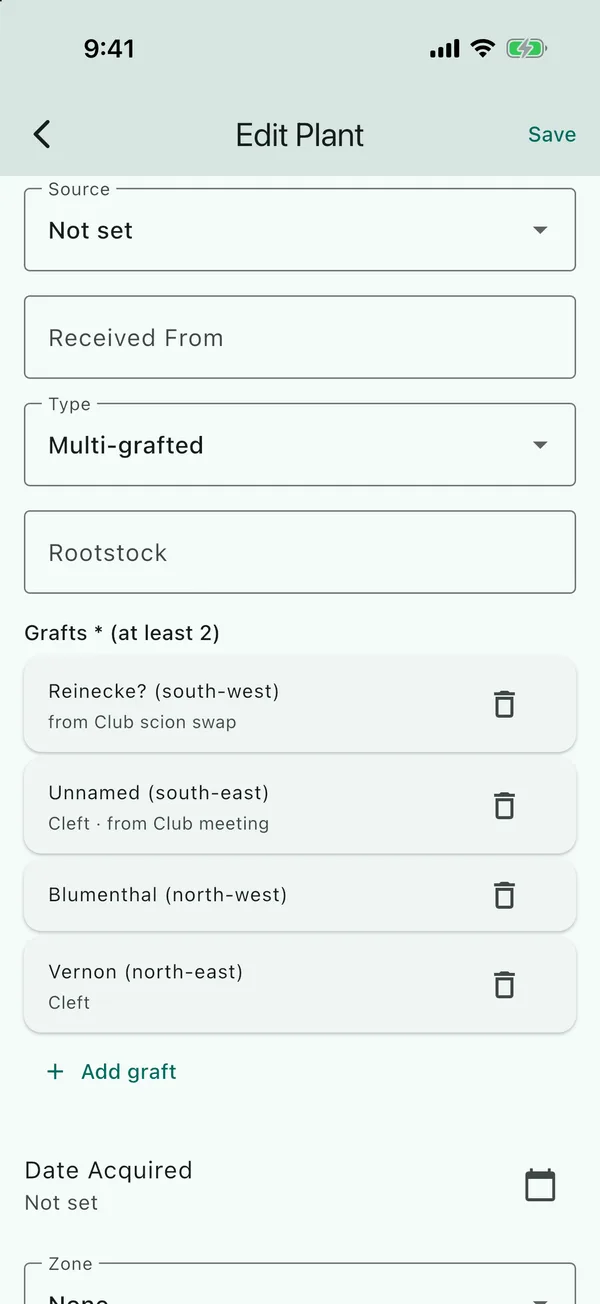
Naming the grafts
Name each graft after its variety. A lot of scions from other growers won’t have a variety name,
as the person who gave it to you just knows it fruits well. For those, use something like Unnamed
and put where it came from in Source.
There isn’t a separate field for where a graft sits on the tree. If you’d like to record it, add
it to the name in brackets, as the name is what you’ll see in the Grafts row, on photo badges
and on the gallery’s filter chips. For example, Vernon (north-east) or
Unnamed (south-east).
When one variety doesn’t take
Mark that graft Failed rather than removing it; see marking a graft that didn’t take. Failed grafts still count toward the two a multi-grafted tree needs, and the tree keeps saving. If only one variety is left alive and you don’t plan to re-graft, change the Type to Grafted.
Grafted the same variety more than once?
Three attempts at the same avocado variety are still one variety. Set the tree’s Type to Grafted, not Multi-grafted, and keep one graft per attempt, all with the same name. The attempts that failed are marked Failed.
Updated . Something here doesn't match what you see in the app? Tell me and I'll fix the guide.