
What do the fields on a tree mean?
Only Common Name is required. Source is how you got the tree (bought, given, traded or found), Received From is who or where it came from, and Type is how it was grown (seed, graft, cutting and so on).
You can leave every field except Common Name empty, and fill any of them in later by tapping the pencil on the tree’s page (which icon is that?).
Every field
| Field | What it’s for | Example |
|---|---|---|
| Common Name | The name you call the tree. Required. It suggests names you’ve already used, which keeps the spelling the same each time. | Custard Apple |
| Plant Tag | A short tag, usually a number, matching a physical tag on the tree. Filled in with the next number at that location. | 104 |
| Variety / Cultivar | The named variety. Once you’ve entered a Common Name, it suggests varieties you’ve used for that name first. | Paxton prolific |
| Scientific Name | Tap to open Genus and Species. Useful when common names overlap, like Paw Paw and Papaya. | Annona atemoya |
| Source | How you got the tree: Purchase, Gift, Trade or Found / Wild. | Purchase |
| Price | Only appears when Source is Purchase. Optional even then. | $10.00 |
| Received From | Who or where the tree came from: a nursery, a shop, a friend, a club. | Club plant sale |
| Type | How the tree was grown: Seed, Grafted, Multi-grafted, Cutting, Marcot or Division. | Seed |
| Rootstock | Only appears when Type is Grafted or Multi-grafted, along with the tree’s grafts. See adding a graft. | Atemoya |
| Date Acquired | When you got the tree. It can’t be in the future. | 10 January 2026 |
| Location | Which of your locations the tree is at. Only shows with Pro and two or more locations. | My Home |
| Zone | A part of the location, like a bed or a row. See locations and zones. | Front bed |
| Status | Alive, Dormant, Dead, Removed or Unknown. A new tree starts as Alive. | Alive |
| Notes | Anything else. |
Source, Received From, and a graft’s Source
These are easy to mix up, as two of them describe where something came from.
- Source is how you got the tree: Purchase, Gift, Trade or Found / Wild.
- Received From is who or where it came from, such as a nursery, a friend or a club.
- Type is how the tree was grown. If you buy a seedling, Source is Purchase and Type is Seed.
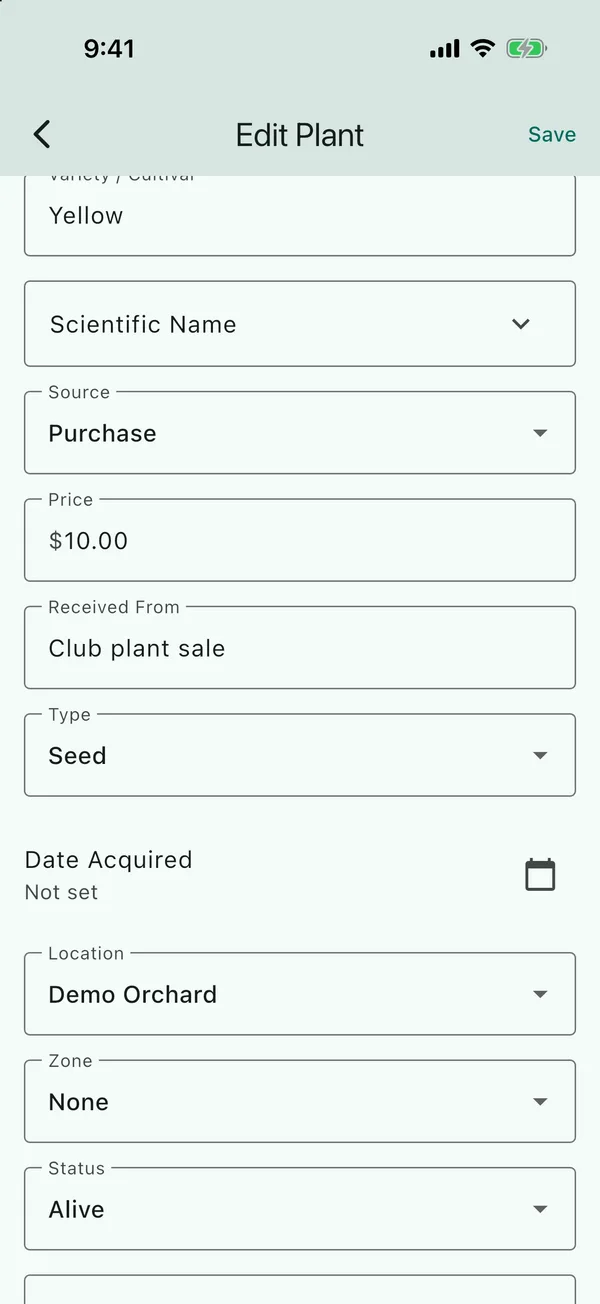
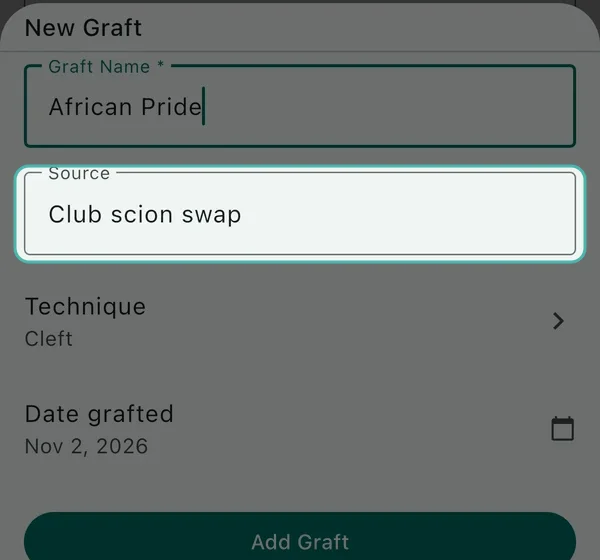
If you graft a tree, where the tree came from is recorded in Received From, and where the scion came from is recorded on the graft, in a field that’s also called Source. All of these are optional.
I usually fill in Type (seed, cutting and so on) and Received From. I’ll add a scientific name later if I remember, as most of the time I don’t know it unless there’s a label on the tree.
Status
Status is only a label. If you mark a tree Dead or Removed, it stays in your list, on the map and in search, with its photos and activities. If you’d rather it was gone, delete the tree instead, but its photos go with it and you can’t undo it.
In the app the first status is shown as Alive, but in a spreadsheet export it’s written as
active.
Updated . Something here doesn't match what you see in the app? Tell me and I'll fix the guide.